Launch your pizzeria with a clear, 30-step system.
✓ Free access to Steps 0, 1 & 2. No credit card required.
✓ 24-day money-back guarantee on all Launch Systems.
30 structured
steps
Customizable
plans & templates
Download &
print resources
Launch &
daily operations
Built for your next move.

Opening a pizzeria?
Start with a prepared pizzeria model, practical plans, and customizable templates to turn your idea into an organized business.
-
Customize your pizzeria concept
-
Build your business plan and startup budget
-
Develop your menu and calculate recipe costs
-
Plan your layout, equipment, and workstations
-
Define staff roles and prepare training
-
Organize food preparation and service
-
Prepare your opening campaign
-
Set up daily checks and management tools
We’ve built the foundation. Make it yours.

Already running a pizzeria?
Focus on what needs improvement. Use practical tools to review costs, organize your team, and standardize daily operations.
-
Review food costs and menu pricing
-
Plan your budget and cash flow
-
Clarify staff responsibilities and training
-
Standardize food preparation and service
-
Coordinate daily work through the Command Center
-
Strengthen opening, closing, and cleaning routines
-
Organize workstations and task instructions
-
Track performance and prioritize improvements
The tools are built. Put them to work.
Your brand. Your decisions. A structured starting point.
Your pizzeria.
Built as one connected system.
Adapt them to your pizzeria, with each decision supporting the next.

Concept & business model
Start with a developed pizzeria concept. Adapt the products, service style, and customer experience to make it your own.

Customers & market research
Use practical worksheets to assess your local market, compare competitors, and identify the customers you want to serve.

Business plan & finances
Customize your business plan and financial worksheets to estimate startup costs, plan funding, and assess financial feasibility.

Menu, recipes & pricing
Adapt the product catalog and recipe resources. Update ingredients and costs, build your menu, and set your prices.

Brand, marketing & sales channels
Develop your brand and customize the marketing plan, promotional materials, and sales channels to reach your customers.

Layout, equipment & workstations
Use area guides and equipment lists to plan your space, organize workstations, and connect food preparation with service.

Team, processes & daily operations
Adapt staff responsibilities, training materials, procedures, and checklists to guide your team’s daily work.

Launch planning & performance tracking
Plan your opening with the roadmap. Use the Command Center and management tools to coordinate daily work and review results.
How you put it to work
Set up your workspace. Explore the model. Put your plan into action.

Set up your Operations Room
*No credit card required.

Explore
Steps 1 & 2

Put your plan
into action
Give your plans a place to take shape.
-
Download your free Step 0 resources
-
Set up your roadmap and planning tools
-
Track decisions, tasks, and progress
*No credit card required.
✓ No credit card required for free access. ✓ 24-day money-back guarantee on all Launch Systems.
See inside Pizzeria Launch OS.
Explore the model, plans, templates, and operating tools you can adapt
to your pizzeria—from business planning to daily operations.
01
A pizzeria model to make your own.
-
Signature pizzas and build-you-own options
-
Salads, sides, desserts, and drinks
-
A starting point you can customize
02
Know your customers. Understand your market.
-
Define the customers you want to serve
-
Map and compare nearby competitors
-
Adapt your offering to your local market
03
Turn your concept into a business plan.
-
Estimate monthly customer numbers
-
Set average spending assumptions
-
Project first-year sales by channel
04
Evaluate your location before you commit.
-
Compare sites against a benchmark
-
Review traffic, visibility, and access
-
Check fit with your concept and budget
05
Know the numbers behind your menu.
-
Organize items by menu category
-
Update recipe costs and selling prices
-
Compare gross margins across items
06
Plan your kitchen, station by station.
-
Identify equipment and storage needs
-
Organize tools and ingredients
-
Standardize station setup and reset
07
Give your team a clear way to work.
-
Plan what to prepare and how much
-
Follow a defined production sequence
-
Check timing, yield, and quality
08
Prepare your team for everyday service.
-
Demonstrate operating procedures
-
Clarify customer service expectations
-
Support onboarding and refresher training
09
Give your pizzeria a consistent identity.
-
Define your logo and color palette
-
Coordinate uniforms and signage
-
Carry your brand through packaging
10
Make food safety part of the routine.
-
Define controls and responsibilities
-
Label ingredients and prepared batches
-
Document checks and corrective actions
11
Plan your team and launch budget.
-
Estimate startup costs and cash needs
-
Map roles, tasks, and shift coverage
-
Review team size and labor costs
12
Turn your plans into daily action.
-
Assign tasks and clarify ownership
-
Track checks, incidents, and follow-ups
-
Review results and set priorities
13
Step inside the pizzeria model.
-
Explore the restaurant environment
-
See equipment and service in context
-
Find ideas for your own space
14
Start each day with a clear routine.
-
Prepare dining and kitchen areas
-
Assign tasks to the right team members
-
Complete checks before service begins
15
Plan your startup funding needs.
-
List one-time startup costs
-
Estimate working capital needs
-
Allow for unexpected expenses
16
Shape your offer around your customers.
-
Define the customers you want to serve
-
Review needs, habits, and preferences
-
Align your menu, service, and messaging
17
Plan a space your guests can enjoy.
-
Define dining areas and walkways
-
Consider shade and weather protection
-
Coordinate lighting, furniture, and style
18
Carry your brand beyond the counter.
-
Coordinate boxes, bowls, and cups
-
Adapt loyalty and partnership materials
-
Keep a consistent look across formats
See the system in action
Preview the branding, kitchen workflows, and practical training inside Pizzeria Launch OS.
The Pizzeria Brand Experience
The Pizza Assembly Line
Dough Tray Preparation
YOUR NEXT STEP
One system. Two ways to pay.
Start free, then choose the payment and access option that fits your plan.
Pay in full
$899
-
Access all 30 steps immediately
-
All included templates and operating tools
-
Download resources and work at your own pace
Monthly plan
$99/month
-
System content released in stages
-
Download resources as they become available
-
All included templates and operating tools
Prices shown apply to Pizzeria Launch OS.
A few things to know.
Who is this system for?
What can I access for free?
What does the system include?
How does the 24-day money-back guarantee work?
Can I customize, download, and print the resources?
How do the payment and access options differ?
Get in touch
-
-
RESTAURANTSTARTUP.us LLC
2105 Vista Oeste ST NW
Suite E#1122
Albuquerque, NM 87120 -
hello@restaurantstartup.us
-
Featured Links
-
Launch
-
Solutions
-
Pricing
-
About Us
-
Help Center
-
Terms & Conditions
-
Disclaimer
-
Privacy Policy
-
Cookie Policy
-
Submit a Ticket
Join Our Newsletter
OUR STORY
Over more than 25 years in consulting and the restaurant industry, I’ve developed, launched, and operated restaurant concepts across different segments. I know the excitement of bringing an idea to life—and the pressure of turning that idea into a business that works every day.
Even as my experience grew, I kept returning to the same question:
Where is the practical, step-by-step
system that brings all of this together?
A restaurant involves hundreds of connected decisions. Your menu affects your equipment. Your equipment shapes your layout. Your layout influences staffing, service, and costs. A decision in one area can change what you need everywhere else.
I wanted a resource that explained those connections and helped me work through them in the right order.
Turning experience into a practical system.
That experience became the foundation of RestaurantStartup.us.
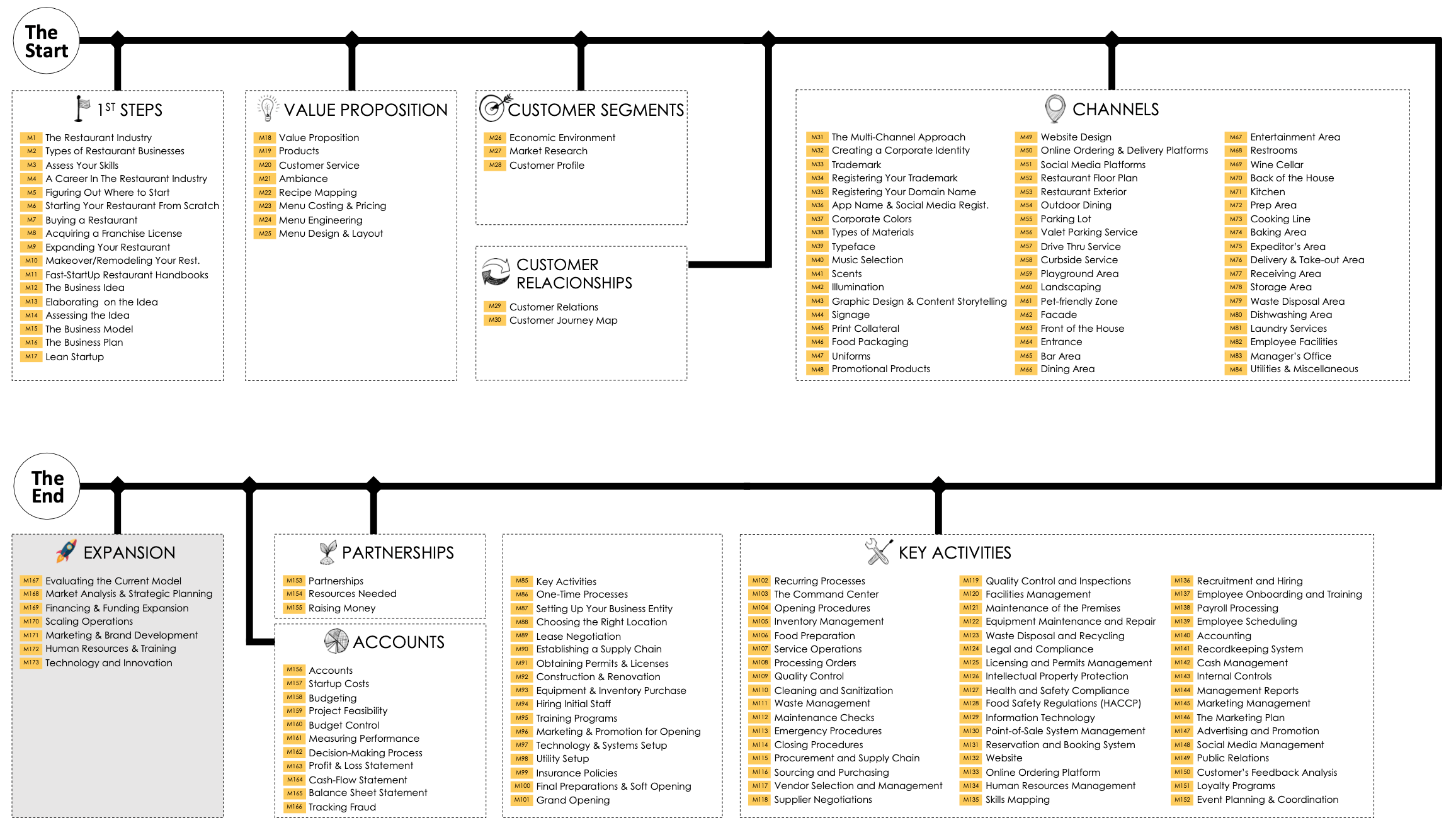
Together with my team, I spent three years developing and refining our Fast Startup Methodology. We brought that approach to life through Restaurant Launch OS: a practical system that organizes the journey into 30 structured steps.
Each Launch OS is built around a specific restaurant model, with developed examples and customizable resources you can shape around your own business.
The system connects your concept, customers, menu, and finances with your location, layout, team, daily operations, marketing, and launch. Along the way, you receive guidance, plans, financial tools, worksheets, and operating resources to help you put your decisions into practice.
You can see what to work on, understand why it matters, and use the resources to move forward.
Our mission
Whether you’re preparing to open your first restaurant or improving one you already own, our commitment is the same: to make the work clearer, more connected, and easier to put into action.
Get to know the system before you commit.
We’re proud of the care and detail behind Restaurant Launch OS, and we want you to experience its value for yourself.

Thank you for taking the time to get to know us. I know how much thought, effort, and personal commitment goes into building a restaurant. That is what we had in mind when we built this system—and what continues to guide our work.
Let’s move your restaurant forward.
— Jaime & the RestaurantStartup.us Team
ROADMAP